
Sidebar
projectzomboid:projectzomboid
Table of Contents
Project Zomboid
CRAZY's Project Zomboid Server
NEWS
Build 42 Multiplayer is here!
Preparing the Game
Connecting to CRAZY's Server require setting launch parameters if launching from Steam, and downloading and extracting Mods into the correct folder.1)
Launch Parameters
Custom Launch Parameters are not longer necessary
* Right Click on your game in the Steam Library and choose Properties
* In the Launch Options text field enter -nosteam2)\\
Mod Installation
Mods are not used at this time
Download the Mod Pack from the Mods page: Mods
*Extract zip to Mods folder3)
* Windows =
C:\Users\$USER\Zomboid\mods
* Linux = $HOME/Zomboid/mods/\\
Connecting
- On Main Menu choose JOIN
- Under Add to favorites input server information.
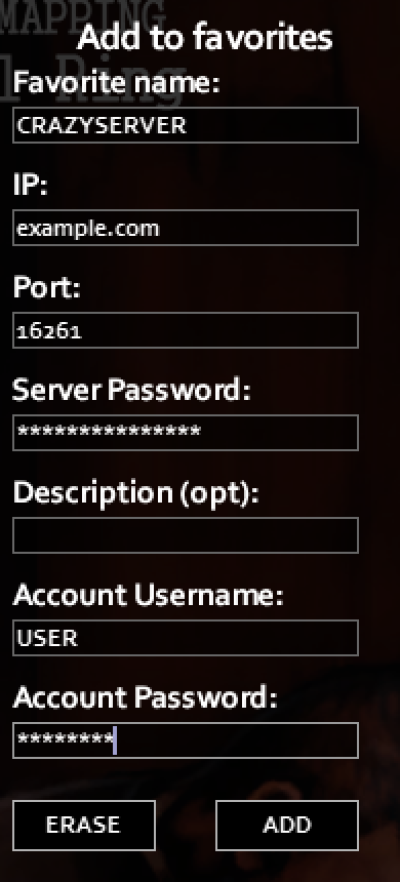
- Favorite Name: CRAZYSERVER
- IP: ask host
- Port: 16261
- Server Password: ask host
- Description (opt): this is optional
- Account Username: create your own
- Account Password: create your own4)
- Click ADD
Click to highlight your newly added server and then click JOIN SERVER near bottom right to join.
projectzomboid/projectzomboid.txt · Last modified: by admin
Except where otherwise noted, content on this wiki is licensed under the following license: CC Attribution-Noncommercial-Share Alike 4.0 International


